TourWell
Here is everything TourWell does.
Every screen, every role and every rule — including the ones we got wrong first and fixed. It is long on purpose: this is the whole product rather than the highlights, so read the bits you care about and skip the rest.
Today
Open the app, see today.
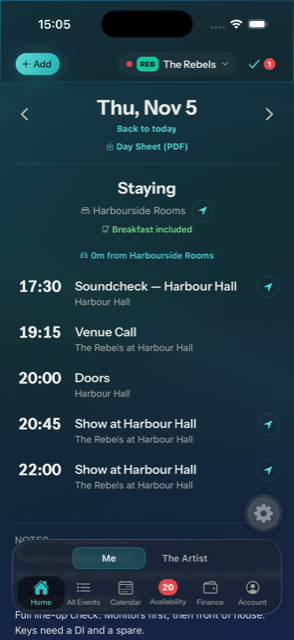
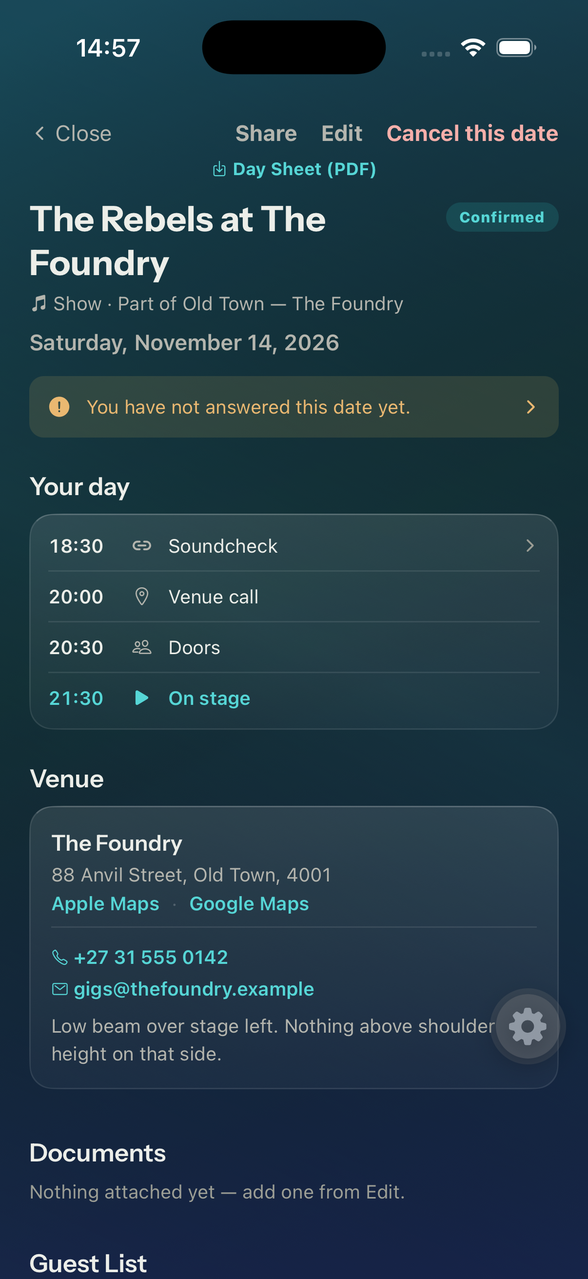
Not a calendar you have to interpret. The day reads top to bottom the way it actually happens — where you're sleeping, what time you're called, when doors open, when you play, and how long it takes to get between them.
Protea Hotel Bloemfontein → Drostdy Hotel · 280 min drive · Lobby 10:15 · Leave 10:30
1 min from Drostdy Hotel
A real day from the app. Drive times between hotels and venues are looked up live from Google, not guessed — including the leg from the hotel you're checking out of to the one you're checking into. The arrows open directions; a held date sits on the day it would fall on, saying what it is waiting for.
Directions, one tap, on the lines that are a journey
The venue and both hotels carry a small arrow that opens directions straight to the pin — not the address as text, which is the one thing on a day sheet nobody can use while loading in. Check-in and check-out both have one, because the trip nobody plans for is the one back from the venue at 1am.
Your maps app, not ours
Apple Maps or Google Maps, chosen once in My Account and used everywhere after that. One button, not a choice offered again in a dark car park. Where a place came out of search it opens the exact pin rather than the nearest thing with a similar name.
A date you're only holding still shows up
Dates added while you're checking availability appear on the day they'd fall on, marked Pending with whatever you're waiting for. They stop being marked the moment the details are in. Knowing tomorrow is spoken for but not yet real is the whole reason to write it down.
Your dates lead; the rest sits underneath
If you play in an artist and also run it, most of what's on a given day isn't yours. So the day splits: what you're booked on first, then everything else you can see, quieter and under a line. Both halves are there — hiding the second would leave an Admin unable to see the schedule they built — but the half that matters at four o'clock on a show day is the one on top. Day sheets print the same way round.
Day sheets as PDF
Export any day as a printable sheet, or a whole tour as a full itinerary. Contacts print on the page, because venues have no signal.
Artists
One app for all of them. One tap between them.
Hardly anyone works for one artist only. There's the main act, a covers gig, a function outfit and someone's studio project — and every one of those has its own calendar, its own WhatsApp group and its own idea of what you're doing in April. TourWell treats that as the normal case, not the edge case.
Switch from the top of any screen
Tap the artist badge and pick another. Calendar, events, home and availability all re-scope instantly — you stay exactly where you were, just in the other artist.
Combined view: everything at once
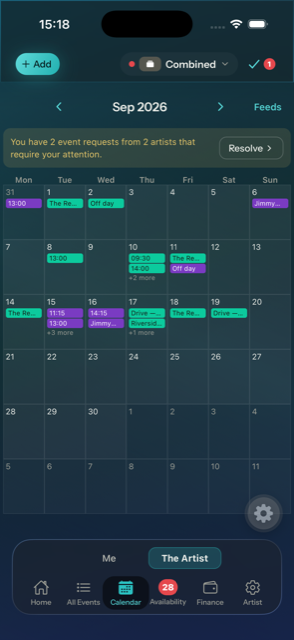
Once you're in more than one artist, a combined view appears. Every date from every artist in a single calendar, each one badged with the artist's short code and colour, so you can tell at a glance whose Thursday it is.
Add dates without leaving it
The + button works in the combined view too — you pick which artist the date belongs to as you create it, and can switch artist mid-form if you started on the wrong one.
Each artist keeps its own everything
Roles, currency, colour, fee visibility and roster are per artist. You can be the Admin who runs one artist and a sub who just gets told the call time in another, on the same login.
Where the clashes come from
The combined view is what makes double-booking visible — and TourWell tells your Admin you're busy without telling them who with. That's the next section.
Roster
Who's in, what they play, and what they'll need at the border.
Roles that match reality
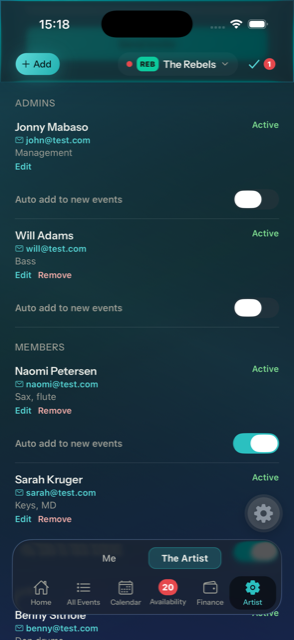
Admin, Member, Sub and Viewer — set per artist, so the same person can run one artist and dep in another. Their instrument is separate from their permissions.
Invite by email
Send a link; they join with a password. Someone who already has an account just gets the new artist added to theirs.
Book who's actually free
When you pick the line-up for a date, anyone already committed elsewhere is marked as you tick them.
Everyone fills in their own
Each person keeps their own details up to date from their account, including which instrument they're down as in each artist. Nobody has to chase a bass player for a passport number twice.
The Artist Info page
Every artist has one page holding the things a tour manager ends up asking for at the worst possible moment — usually at an airport, usually at 6am. It's three plain tables, one row per person, showing every field whether or not it's filled in, so a gap is visible as a gap rather than hidden by being absent.
| Table | What's in it | What it's for |
|---|---|---|
| Personal Info | Name, email, phone, ID number | Reaching people, and filling in forms that want an ID |
| Passport & Visas | Passport number, issue and expiry dates, every visa with its own country and expiry | Booking international travel, and spotting an expiry before a promoter does |
| Clothing Sizes | Shoe, waist, shirt | Wardrobe, merch, and stage clothes ordered without a group chat |
Admins see the roster, you see yourself
The full tables are Admin-only. Everyone else sees their own details on their account page and nothing about anyone else — one member cannot read another member's passport number.
Fee templates live here too
Save the rates you use over and over — a standard club fee, a corporate rate, a festival deal — and apply one to a date in a single tap instead of re-typing five numbers.
Share a template with your other artist
Run more than one artist and you can copy a template straight across. Per-person amounts are deliberately left behind — they're tied to specific people in the original artist, and silently carrying one person's rate into another roster is exactly the kind of mistake money features shouldn't make.
Riders are next
Tech and hospitality riders are designed to live on this page alongside the tables. Not built yet — see the status section at the end.
Availability
It knows about your other artist.
This is the reason TourWell exists. Deps, session players and anyone in two projects live in permanent fear of double-booking. TourWell watches every artist you're in at once.
You find out while you're still ticking the box
Pick a date, start ticking the line-up, and anyone already spoken for that day is named in red underneath it — before you save, before you've told anyone they're booked. One line for however many people, each carrying its own reason, because four red lines for a four-piece is noise rather than information.
Where you could have opened the other date anyway — it's your own artist, or another one you're in — it says which date it is and whose. Where you couldn't, it says "another artist" and stops there. The warning tells you the day is taken without ever becoming a way to read a calendar you have no business reading.
Who's on it, before what it is
The line-up sits at the top of every form, above the venue and the times, with the override switch beside it. You choose the people first because they're what the clash warning answers — and a warning that arrives after you've filled in the whole date arrives too late to change it.
Clashes surface themselves
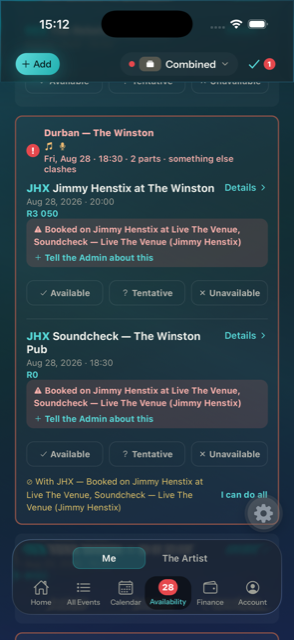
If you're committed to another artist that day — a show, a flight, a drive, even a hotel night — the date is flagged red before anyone books you. A commitment that runs for days holds all of them: fly out Tuesday and back on Friday and the whole week is taken, not just its two ends.
It asks about the commitment, not the pieces
A show is rarely one entry. It's a drive, a hotel, a soundcheck and a set, and being asked four separate times whether you can do the same night is how people stop answering at all. TourWell keeps those entries together as one thing and asks once. Answer it and the whole night is answered.
Say yes, no, or maybe — and say why
Answer each date, and add a note the Admin sees in your own words: "Flight lands 09:40, I can make the call if it's after 14:00." The note retires when the clash does.
"I can do both"
Sometimes a clash isn't one. Accept everything on a date and the warning resolves itself, for everyone looking at it — including on the Admin's list, which stops asking about a date that has already answered itself.
One list of what needs chasing
Every date with somebody unavailable on it lands in a single Admin tab, with the who-answered-what grid beside it. Fixing one is an Admin's job, so the three ways to do it are under Admin.
And a separate list of who hasn't replied
Silence is not a refusal, so it stays off the chasing list — but it is the thing you actually chase. On a list of problems, "nobody has said no" and "everybody has said yes" look identical, and the difference between them is whether you have a band on Friday.
So the dates still waiting on someone get their own tab, each one naming who is yet to answer and who is already in. Two of five back is a different afternoon from four of five.
Block your own time
Holidays, weddings, day jobs. Block a range once and it applies across every artist you're in, with the option of telling them why.
Schedule
A tour is made of moments, not dates.
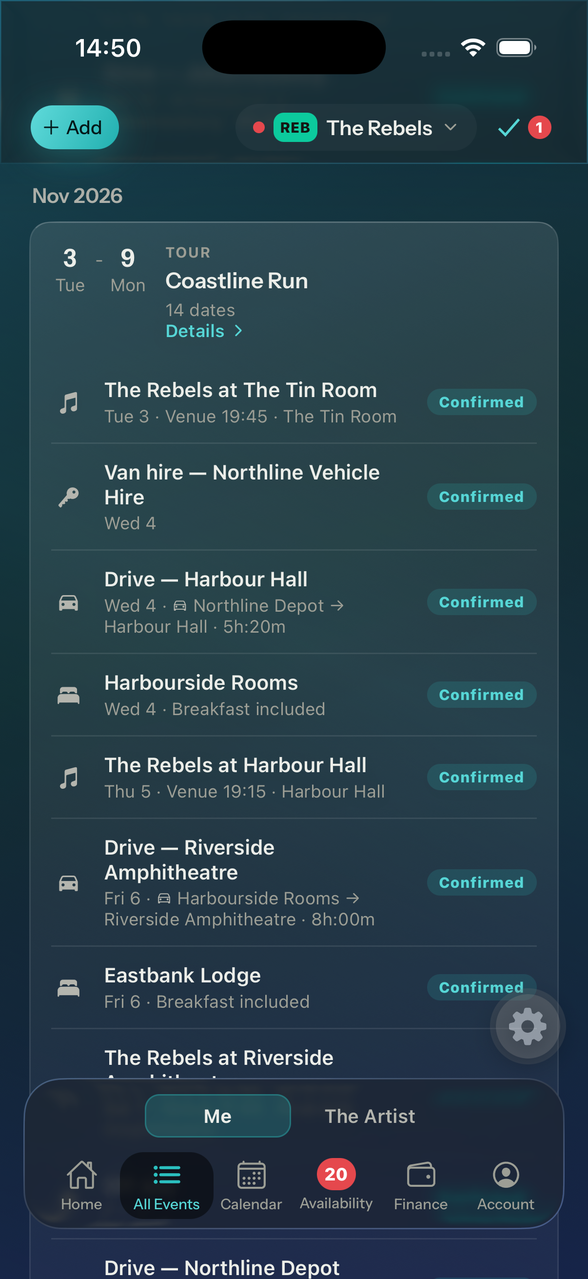
Most tools give you one blob per gig. TourWell breaks a day into the things that actually have times attached — each one its own entry, with its own start and duration.
Build a whole run in one sheet
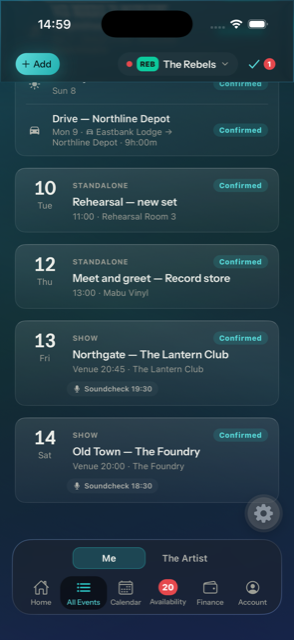
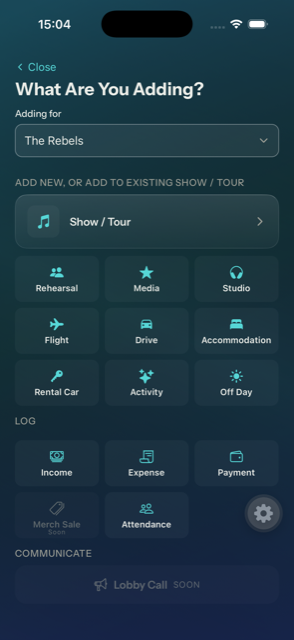
Add as many events as a day or a week needs — flight, drive, hotel, soundcheck, show — before saving anything. Drag them into order, duplicate the ones that repeat, and set the line-up once for all of them or per date.
The same sheet decides whether they're a tour. Leave it on "No tour" and they're one-off dates, which is a complete answer rather than a lesser one. Pick an existing tour and they join it; or name a new tour right there and they start it. There's no "set the tour up first" step to forget, and nothing has to be decided before you begin typing.
Anything in a tour then earns a page of its own: the whole run in order, a PDF itinerary for the lot, and what it pays you.
Real places, real distances
Venues and hotels come from Google search, so map links and drive times are exact. Distances between venues and from your hotel are calculated for you — and so is the leg from where yesterday finished to where today starts, which is the one nobody budgets for.
Put a date on a show you already made
Shows are rarely finished in one sitting. The venue confirms, then a week later the flights land, then somebody books the hotel. So a show you already created is something you can add to: the sheet offers it alongside "new show", and a single date can join it from its own form.
The same picker is how you fix a mistake. A flight filed under the wrong show, or under no show at all, moves to the right one in two taps — and a date is never offered as a home for itself.
Open the flight, see the show it belongs to
Every entry knows what it's part of. Open the airport drive and the rest of that run is listed underneath it — the flight, the hotel, the soundcheck, the show — each one a tap away. You never have to go back out to the calendar to work out why you're at an airport on a Tuesday.
Calls that follow what they're a call for
A call time is chosen as a phrase — an hour before doors, ninety minutes before the flight, meet somewhere at a time — rather than dialled in on a clock face. Move the thing it's a call for and the call moves with it, in the database and not just on the screen you happened to be looking at. Nearly every kind of entry can carry one.
Hold a date before you have details
Add a date with nothing but a label — "Just checking availability" or "Details requested from promoter" — and fill it in when the promoter finally replies.
Contacts where you'll need them
Venue phone and email on every venue, promoter name, phone and email on every show. Tap to call or write, straight from the event.
The ten kinds of entry
Every one of them takes notes, a line-up and a confirmed-or-pending status, and every one blocks you across your other artists. Fees sit on all of them except accommodation and activities. They're all filled in in the same order — who's on it, where it is, who to ring when you get there, what time it happens, what it pays — so moving from a flight to a hotel never means hunting for where a field went. What differs is the handful of fields each type actually needs.
- Show
- The gig. More than one venue for festival days, doors, set times with their own durations, venue call, soundcheck or line check, and promoter contact. The only type with its own name field — a festival isn't called after its venue — and the only one whose length is worked out from its own schedule instead of typed in.
- Soundcheck
- A check that isn't part of the show entry: its own room, its own time. For the ones that happen the day before, or somewhere else entirely.
- Rehearsal
- Where, when, how long. Fees show open rather than behind a toggle, because rehearsals are usually paid on their own terms.
- Media
- Press, radio, a photo shoot, an in-store. A place, a start time and a duration, so it sits in the day next to everything else competing for those hours.
- Flight
- Airline and flight number, departure and arrival airports with their times, lobby call and airport call. An arrival date too, for the ones that land the next morning.
- Drive
- Where from, where to, and how long it really takes — the drive time comes from Google, not a guess. Then either a lobby call or a "meet at" place and time, whichever the day actually works on.
- Accommodation
- The hotel, with check-in and check-out times, the check-out date, whether breakfast is included, and the booking reference. It spans its nights on the calendar, ending the morning you leave.
- Rental Car
- Company, vehicle and booking reference, with a pick-up and a return that each have their own place and time. One switch makes it a one-way hire. A car kept for days puts a collect and a return in the calendar rather than a week-long block.
- Activity
- Anything else with a time on it — a meet and greet, a dinner, a press lunch, whatever the day has been sold into.
- Off Day
- Nothing scheduled, and that is the point: it still marks you as taken in every other artist you play in, so nobody books over the one day you were promised.
Feeds
It shows up in the calendar you already use.
Nobody wants a second calendar app. Every feed is a subscription link that Apple, Google and Outlook Calendar refresh on their own — change a set time in TourWell and it changes on the drummer's phone without anyone doing anything.
One artist, or all of them at once
Take a feed for a single artist and it carries only that artist's dates. Take the combined feed and every artist you're in lands in one calendar, each date badged with which artist it belongs to — the whole working life in a single view.
Shareable links for people outside the roster
An Admin can create named, artist-wide links for anyone who needs the schedule but shouldn't have an account — a booking agent, a publicist, a venue, a parent. Name each one for who it went to, hand over the link, done.
Revoke a link the moment you need to
Agent moves on, a link ends up somewhere it shouldn't — delete it and it stops working immediately. Everyone else's feeds keep running. Make as many as you like; each is separate and separately revocable.
Outside links see less, by design
A shared link carries dates, venues, doors and set times — and nothing else. No fees, no per diems, no notes, no hotels, no flight or drive details. That isn't a setting someone can get wrong; the shared feed is built from a different, money-free query.
Working nights and management nights, on separate feeds
If you run an artist and play in it, every date it has lands in your calendar and they all look the same. So each feed comes in three forms: everything, only the dates you're on, and only the dates you're not. Subscribe to both halves, colour them differently, and mute the management one while you're away. The two halves add up to the whole exactly — nothing is dropped and nothing appears twice.
Addresses your phone can actually navigate to
Where the venue was picked from Google, the entry carries real coordinates, so Apple Calendar shows a map, offers Directions and can fire a leave-now alert; Google Calendar reads the same location. A typed address still travels as text. A festival day with several stages uses the first venue — the one you're called to.
One entry a day, or one per event
Every event puts the soundcheck, the show and the hotel into your calendar on their own lines. One a day collapses the lot into a single all-day entry with the detail inside it — for people who want to see that they're working rather than the shape of it. Chosen once in My Account, and feeds you've already subscribed to change with it.
Your own feed shows exactly what you'd see in the app
A personal feed runs as you. A sub sees the dates they're booked on; an Admin sees everything. The same rules that govern the screen govern the calendar.
| Feed | Who it's for | Carries |
|---|---|---|
| Single artist | You, per artist | That artist's dates, at your own permission level |
| Combined | You, across every artist | All your dates, badged by artist |
| Dates I'm on | You, when you both play and manage | Only where you're in the line-up — per artist or across all of them |
| Dates I'm not on | The same person, second subscription | Everything else you can see, so it can be coloured or muted separately |
| Named share link | Agents, press, anyone without an account | Dates, venues, doors and set times only — revocable at any moment |
Money
Everyone sees their own number.
Fees are the most sensitive thing an artist holds. TourWell lets an Admin decide, per role, which figures each person can see — enforced by the database, not by hiding a screen. The exact switches are further down, under what an Admin can do.
| Figure | What it is |
|---|---|
| Artist fee | What the booker pays for the date |
| Per person | One shared rate, or a different number for each person — subs often sit on their own |
| Per diem | Daily cash, per person |
| Extras | Anything owed to one person on top — gear rental, driving the van, an extra set |
Save a rate once
Fee templates per artist, applied to a date in one tap — and shareable with another artist you run.
Tours add themselves up
See what a run earns you across every date, with tentative and declined dates kept out of the total.
Two currencies, and no confusion about which is which
There are exactly two currency settings in TourWell, and they do different jobs. The artist currency is set once per artist by an Admin: every fee for that artist is entered, stored and paid in it. It's the truth. The home currency is set by you, on your own account, and it never changes a stored number — it's a reading lens laid over the figures that describe what you earn.
So a South African artist pays in rand whether or not the drummer lives in Berlin. The drummer just sees it in euros as well. Nothing is converted on the way into the database, which means nobody ever invoices against a number that quietly drifted.
| Situation | What you see |
|---|---|
| Same currency | R3 500 — untouched, no conversion shown at all |
| Different currency | ≈ €182 (R3 500) — the original never leaves the screen |
| A tour across two countries | ≈ €1 640 — from R12 000 + $450 |
| No rate available | R3 500 — the original, with no ≈. Never a guessed number |
Rates arrive before you do
Eight currencies, synced once a day on the server rather than fetched by your phone. A currency service having a bad morning must never be the reason a call sheet is slow to open.
Every rate is kept, not overwritten
The full history is stored, so a fee earned in March can still be invoiced against March's rate. Today's number is just the most recent row, not a value that replaced the old one.
Changing an artist's currency relabels, never converts
If an Admin switches the artist currency, TourWell says plainly that existing amounts are relabelled and nothing is recalculated — so a wrong tap can't silently multiply the books by eighteen.
Admin
What an Admin can do.
Admin is the role that builds the schedule, holds the money and decides who sees what. Whoever creates an artist is its first Admin; after that the role is handed out at invite time and can be changed later. Everything below is Admin-only — and it's Admin-only in the database, so it isn't a screen that could be reached by knowing where to look.
Building the schedule
Tours get their own page
Every date in the run in order, and a PDF itinerary for the whole thing — the document a tour manager hands out or prints at 6am. Building those dates is covered further up; what a run pays is under Money.
Hold a date you haven't confirmed
Mark a date as pending with your own label, so a hold looks like a hold to everyone rather than like a booking.
Cancel without deleting
A cancelled date stays visible and marked, because "there was a show here and it's off" is different information from "there was never a show here".
The line-up
Book people per date
Tick who's on it. Anyone already committed elsewhere is flagged as you tick — you find out while you're still choosing, not after you've told them.
A default line-up, and a way out of it
Set the usual line-up once so it fills itself in, then override it on any date where the usual line-up isn't who's playing. The override wins for that date only.
Put yourself in automatically
One toggle adds you to the line-up of every event you create — on if you're in the line-up, off if you only run it.
Who sees which money
This is the part Admins usually want to see before anything else. Five separate switches, set for each of three roles, every cell independent. Note that a person's own fee and everyone else's are two different switches — that's the whole point. You can tell someone what they're earning without telling them what the guitarist earns. Admins always see everything.
| Switch | What turning it on reveals to that role |
|---|---|
| Artist fee | The full fee the booker pays the artist |
| Individual member fees | What every other person on the date is paid |
| Their own fee | What this person is paid for the day |
| Per diem | The daily expense amount |
| Additional payments | Gear rental, van hire and the like |
The three roles it's set for are Member (the core line-up), Sub (fills in occasionally) and Viewer (read-only, never booked — so "their own fee" doesn't apply and the app greys it out rather than offering a switch that would mean nothing).
People
Invite with a role already attached
Send an email invite as Admin, Member, Sub or Viewer — the permission is set before they arrive, not fixed up afterwards. Change it later from the same list.
Hide someone without erasing them
When a player leaves, hide them from the roster: the rest of the roster stops seeing them, while they and the Admins keep full access to the history they were part of. Removing someone entirely is also there — hiding is for when the past still needs to be true.
Set someone's part
Edit what a person is down as playing, independently of what they're allowed to do. A sub can be your musical director; an Admin can play nothing at all.
See who hasn't accepted
Invited and Active are marked separately, so an unanswered invite doesn't quietly look like a member.
The artist itself
Name, badge, colour, currency
A short code becomes the artist's badge everywhere — the thing you read in the combined view to know whose date it is. The colour goes with it. The currency governs every fee in the artist.
The list splits the same way
All Events splits twice, both with counts: Upcoming and Past, then the dates you're on and the dates you're not. Playing Admins spend most of their time on the first of each and drop into the others when someone asks who's covering Thursday, or when an invoice needs checking against last March. Anyone who only ever sees their own dates — a sub — gets no on/off strip, because there'd be nothing on the other side of it.
Everything that needs chasing, in one tab
An Admin-only Needs Attention tab, listing dates rather than people — a date with two players out is one problem to solve, not two. Each card names who can't do it and whatever they wrote about why, with the roster availability grid underneath. The tab goes red while anything is on it and the count rides on the dock icon, so you don't have to open it to know. One place, instead of scrolling a month looking for red.
Awaiting Response, next to it
The same list from the other side: dates the line-up has not finished answering, with the count on the tab. It never turns red — nobody has refused, and a tab that shouts about a date created an hour ago is a tab you learn to ignore. Every booked person is on the card, so you can see at a glance whether you are waiting on one person or on everybody.
Replace, remove, or keep them on anyway
Three ways out, offered per person, because with two out you may well sub one and drop the other. Replace swaps in someone else from the roster without leaving the tab, and says out loud what they'll be paid — the seat's fee goes with the seat. Remove takes them off the date. Keep them on anyway is for when you've spoken to them and it's settled; it's remembered between sessions, and the card can be brought back if it turns out it wasn't.
The first two change the booking, which is the whole point. A button marked Sorted that only clears the flag leaves an unavailable player on a show and a tab that lies about it.
Share links for people outside the roster
Named, revocable calendar links for agents and press — covered in the feeds section above.
Who changed which date, and when
An Activity tab in Artist Settings: every change to the artist's dates, newest first, with the name against it. It leads with After your change — dates somebody else touched since you last edited them, which is the question an Admin actually has. Amounts are never recorded here; the log says the fee changed, and the fee itself stays where its permissions are.
The guardrails
An artist can't lose its last Admin
The database refuses it. Not a disabled button — an actual rule that holds no matter which screen the change came from, so nobody can lock an artist out of its own schedule.
Clearing out a run of dates
Select several dates in All Events and delete them as one act, with a warning that names what's going. Either the whole selection goes or none of it does — and a selection spanning an artist you don't administer is refused outright rather than half-deleted.
Deleting an artist shows you the damage first
Before anything happens you see the count of what goes: how many dates, how many shows, how many people lose access, and whether those people still have other artists to land in. Then you type DELETE to confirm — and the server checks what you typed too, rather than trusting the app to have asked.
Admin-only means Admin-only
Every one of these actions is re-checked server-side against your real role. The interface hides what you can't do; the database is what stops you doing it.
Offline
The venue has no bars. The show still happens.
Load-in is a concrete room under a building. The tunnel is forty minutes long. The flight has no wifi. TourWell is for people whose working day happens in exactly the places a phone stops working — so it keeps going when the connection doesn't, and it is honest with you about what it is showing while it does.
Your schedule is already on the phone
Today, the calendar, a date's details, the whole run — whatever you've looked at is kept on the device and comes straight back with no connection. A saved copy always says so, and says how old it is, because a six-hour-old lobby call presented as today's is worse than no lobby call at all.
You can still answer, and still add dates
Say yes to the 14th, block a week for a wedding, change a fee, add a whole run of dates with a new tour — all of it works with no signal. Each change is written to the phone before the screen tells you it saved, so nothing is lost to a crash, a flat battery or walking out of range mid-tap.
It sends itself when you're back
Nothing to remember and nothing to press. The moment there's a connection your changes go out, and a quiet line says how many were sent. Open the app and it tries; keep it open in a moving van and it keeps trying on its own.
One light, top right, on every screen
A tick when everything you've done has reached TourWell. A cloud with a number when it hasn't. Tap it for exactly what's waiting, by name, and a button to try now. The question — did my change actually go? — gets asked ten minutes before doors, so the answer lives in the corner of every screen rather than three taps into a settings page.
And what changed while you weren't looking
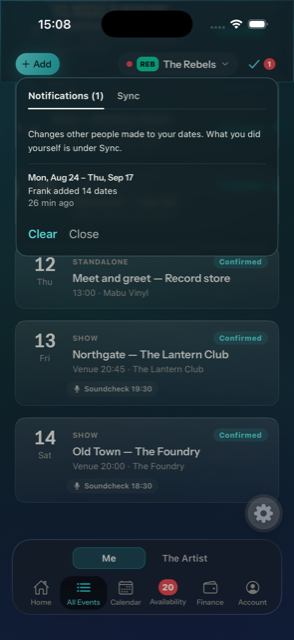
The same light holds notifications: what other people did to your dates, in plain words — Sam changed the call time and the fees. The opposite question to sync, and on tour the more dangerous one, because a call time that moved without you is a missed load-in.
One line per thing that happened, not per field
An edit that moves four things arrives as one line naming all four. Somebody working through a thirteen-date tour in one sitting arrives as 13 dates, 13–25 Aug, not thirteen identical sentences. A badge that cries wolf is a badge people stop reading, which makes it useless exactly when it isn't.
Read on the laptop, read on the phone
Where you've got to is kept for you, not for the device. Clear the list at a desk and it's clear in the van — finding the same notifications waiting on the other screen is the small dishonesty that teaches people to ignore a badge.
If two people change the same date, nobody's work disappears
An edit made at 11pm in a venue might arrive at 9am the next morning — possibly after somebody else has already moved the same thing. Rather than the later arrival silently winning, TourWell stops and says so in plain words: someone else changed this date after you started editing; sending yours now would undo theirs. You choose. Nothing is thrown away while you decide.
A record of what you sent, and when it landed
Made 9:04pm, arrived 7:42am. It's the sentence that settles an argument about whether a change was ever sent, and it's kept per phone under My Account › Activity.
The screen never pretends to be current
If you've changed a date and it hasn't gone yet, the date says so before it shows you a number. A run added with no signal is listed as being on this phone only. TourWell would rather tell you what it doesn't know than show you something tidy and wrong.
A whole run lands complete, or not at all
Thirteen dates entered on a flight go out as one thing. There's no state where four of them made it and nine didn't, and no way for a retry to leave you with the same shows entered twice.
Security
A phone on a dressing-room table, and a database that says no.
Two different problems. One is the device: a tour phone gets left on merch desks and in vans, and it is carrying everybody's fees. The other is the server: what a person is allowed to see should never depend on a screen remembering to hide it. TourWell answers them separately, and the second answer is the one that matters when something goes wrong.
On the phone
Face ID, a fingerprint, or your phone's passcode
A tour phone gets left on dressing-room tables, in vans, on merch desks. The lock is what makes it safe for the schedule to live on the device at all.
Whatever your phone already uses
Face ID or Touch ID on an iPhone, face or fingerprint unlock on Android, and the phone's own passcode or pattern where there's no biometric hardware. No second PIN to invent and forget — it's the unlock you already do a hundred times a day.
Money only sits on a phone that locks
Fees, per diems and day sheets are kept on the device only while the lock is on. Turn it off and every saved figure is wiped from the phone immediately — TourWell still works, it just fetches money fresh each time. The bargain is stated where you make it, not buried in a policy.
It asks again after a minute away
Checking a map and coming straight back doesn't make you unlock again. Leaving the phone on a table does.
Losing access takes the fees with it
If your role changes, or you're removed from an artist, the saved figures your old permissions covered are cleared from the device the next time it connects. Access that ends actually ends.
On the server
Every rule about who sees what is enforced at the data layer. A sub can't read another artist's schedule even if they know the address, and a member can't read fee figures they haven't been granted — not because a screen hides them, but because the query returns nothing.
The database refuses, not the interface
Row-level security sits on every table holding artist data, and a single function decides what you are to an artist — Admin, member, or nothing at all. Take someone off an artist and the schedule, the fees and the line-up stop existing for them on their next request. No screen can forget the check, because the check isn't on a screen.
Your fee is yours
Fee visibility is set per role, per artist, and applied before any number leaves the server. Someone who may see their own fee but not the artist's gross is sent their own fee and nothing else — the gross isn't delivered and then hidden, it is never sent.
Shared links carry a token, not a login
A calendar feed handed to a promoter is a long random address that shows less than the app does and can be revoked the moment you want it back. Tokens are stored hashed, so a copy of the database is not a set of working links.
Passport numbers live apart
What a tour manager needs for a border is kept separately from the profile everyone on the roster can see, and reaches the people who actually need it rather than anyone in the artist.
Nothing travels in the open
Every request is encrypted in transit and the schedule sits in a managed Postgres database with automatic backups. Keys for the mapping services live on the server — the app never carries one where it could be lifted out of a phone.
A history that can't be rewritten
Who changed which date, and when, is recorded by the database itself. The app can read that record and has no way to edit it — history the app can change isn't history.
Deleting for real, with thirty days to change your mind
Gone immediately, recoverable for a month
Delete an artist and it disappears at once, for you and for everyone on it, dates and all. Underneath it is held for thirty days, and an Admin from before the deletion can bring the whole thing back in one action — every date, fee and line-up intact.
Then it is actually deleted
After thirty days the rows are removed from the database and age out of the backups on their own cycle. Not archived, not flagged as hidden. The warning tells you which of the two you're doing before you type DELETE to confirm.
Deleting your account leaves the artists standing
Your account goes; the dates you played don't vanish from everyone else's schedule. What was yours alone — your blocked dates, your notes — goes with you.
A single date is a smaller loss
Dates are deleted outright rather than held, because one is quickly re-entered and a thirty-day limbo for it would mean every screen learning about invisible events. The confirmation says exactly that, instead of implying a safety net that isn't there.
Look
Ten themes, none of which break the reading — and one that runs on a clock.
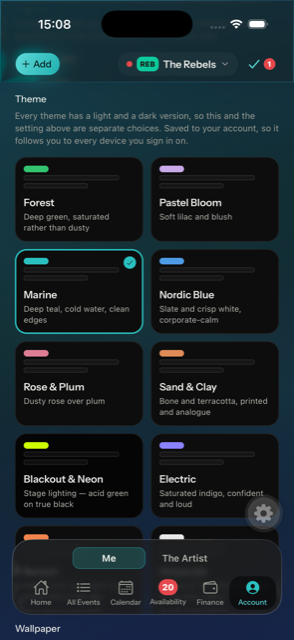
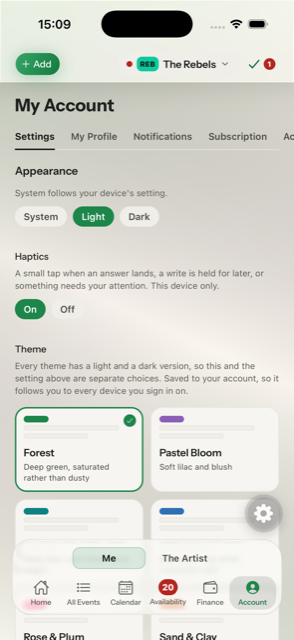
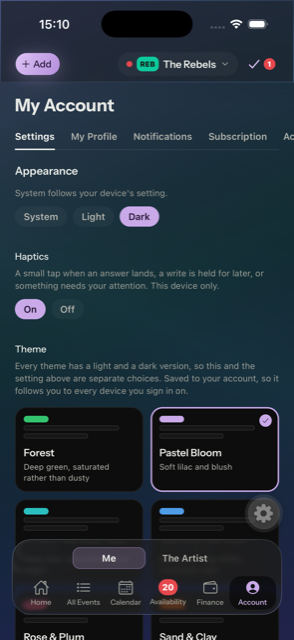
A tour app is opened at 6am in a van and at 1am in a dressing room, by people with opinions. So the palette is a choice — ten of them, each with a light and a dark version, picked in your own account and remembered on your own phone. And for the 1am one, a red night mode that switches itself on at the hour you name.
Forest is the default. Each card is that theme drawing itself — light on the left, dark on the right, both shown whichever mode you are reading this page in, because in the app they are two separate choices.
Touring costs you sleep before it costs you anything else, and the last thing most people do before lights-out is check what time the bus leaves. Long-wavelength red is the light that suppresses melatonin least, so between the hours you set, TourWell drops to a true black canvas lit only in red — over whatever theme and light-or-dark you had on, and handing both back in the morning.
It is a schedule, not a theme: set it once and forget it. It runs on the phone's own clock, so it keeps meaning the same thing in a different time zone every night.
23:00 → 06:00
Every one of them is readable
All twenty-one variants — ten themes in light and dark, plus Sleep Protector — are checked against WCAG AA: body text, primary text, and the label on a coloured button. Several needed their accent darkened before they passed, and did. You're choosing on taste, not trading legibility for a look.
Red still means red
Danger, warning and success don't change with the theme. An error is red and an unanswered date is amber in all ten, because those colours carry meaning rather than mood — letting them drift with decoration would make the one thing you mustn't misread the thing that changes most.
Your artist's colour survives the theme
Each artist keeps its own colour so you can tell artists apart in the combined view, whatever theme is on. The text sitting on that colour adapts to it: a lime-green artist gets dark type, a navy one gets white, worked out from the colour itself rather than assumed. And where an artist's colour would vanish against the background — a near-black artist on a near-black theme — it's lifted just enough to read, keeping its hue.
Night mode is a time, not a taste
Sleep Protector sits outside the ten because you don't pick it in the morning — you set the window it should own. Between those hours it overrides your theme and your light-or-dark both, then gives them back. Everything it draws is red on true black, including the card sheen behind panels, which is white in every other theme and would have put grey light back on the screen.
Light and dark are a separate choice
Every theme ships both, so switching one never resets the other. Follow the phone's own setting or pin it. Kept on the device, because how an app looks belongs to the screen you're holding, not to an account that would redecorate every device you own.
Built
One codebase, every screen you'll open it on.
A phone in a van, a laptop in an office, a tablet on a desk at soundcheck — the same app, changing shape rather than being scaled up. The rules about who sees what sit underneath all of them, in the database, where Security covers them.
One app, every screen
iPhone, Android, tablet and desktop browser from a single codebase. The layout changes shape rather than being scaled up.
Light and dark, both properly
Every piece of text in both themes is measured against accessibility contrast standards, not eyeballed.
Status
Honest status.
This is where we are at.
Everything above, running in the browser on any device, backed by a hosted database.
Installable iPhone and Android apps. The code is ready; it needs a paid Apple developer account before it can go to TestFlight and the stores.
Working with no signal — reading your schedule, answering dates, editing fees and adding whole runs, all sent on their own when the connection comes back. The app lock behind Face ID, a fingerprint or your phone's passcode. Notifications for what other people changed. Directions to every venue and hotel in the maps app you already use. A thirty-day window to undo deleting an artist.
Push notifications when a date needs an answer, and tech and hospitality riders stored per artist.
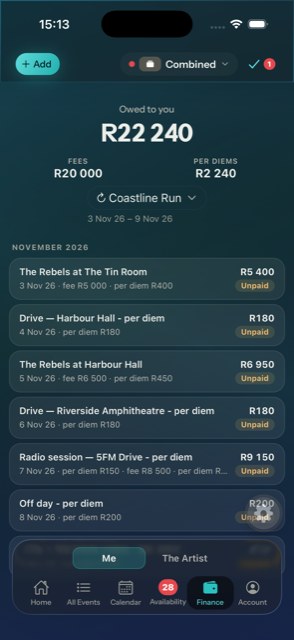
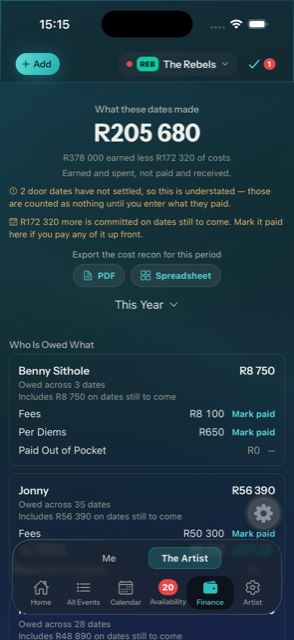
A finance page. Fees came off the events list on purpose — a fee on every row, a total per tour and a running total for the window turned a list of dates into a spreadsheet, and none of the three answered what am I owed properly. That question deserves a page, not a number bolted to a row. Every figure is still on the date itself, and on the card you answer from.
Signing in with Google, Apple or a passkey instead of a password.
Syncing in the background while the app is closed. iOS decides when that runs — often hours later, never at all if the app has been swiped away — so it would raise the best case without moving the worst one. TourWell now records how long each change waited; that's the evidence to revisit it with.